Error Analysis for LLM Applications - Step by step guide
A walkthrough for understanding how your system fails before you build evaluators for it.
Want to do this interactively?
Paste this into your coding agent:
I want to do a systematic error analysis of my LLM application to understand how it fails.
Please install the Langfuse skill (https://github.com/langfuse/skills/tree/main/skills/langfuse)
and the Langfuse CLI (https://github.com/langfuse/langfuse-cli), then guide me step by step
through error analysis.
The skill runs every step alongside you: pulling traces, creating annotation queues, clustering your notes, and computing failure rates. You make the domain calls.
What to expect
The agent maps the work to a TODO list across five steps, then walks through each one with you.
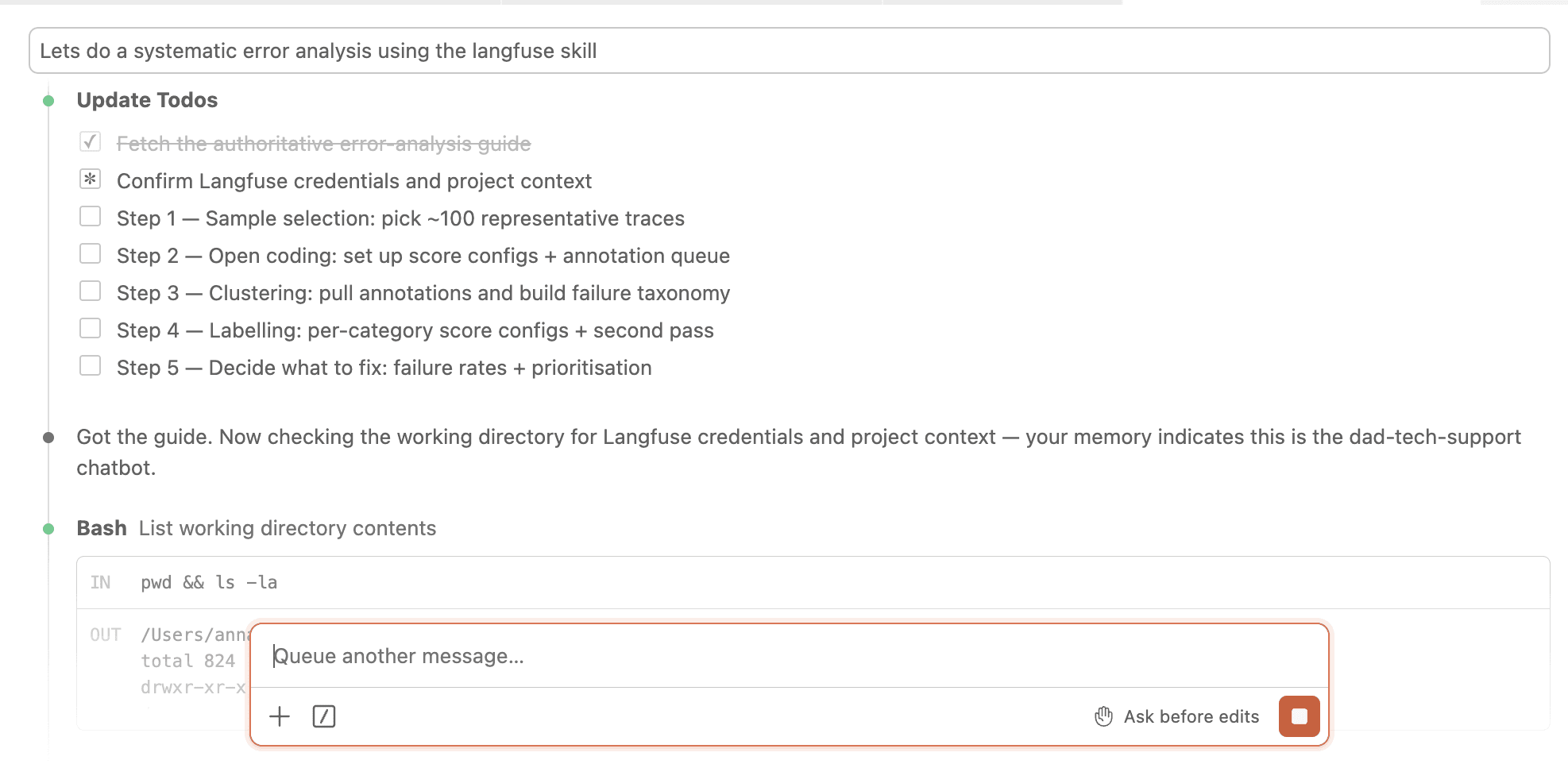
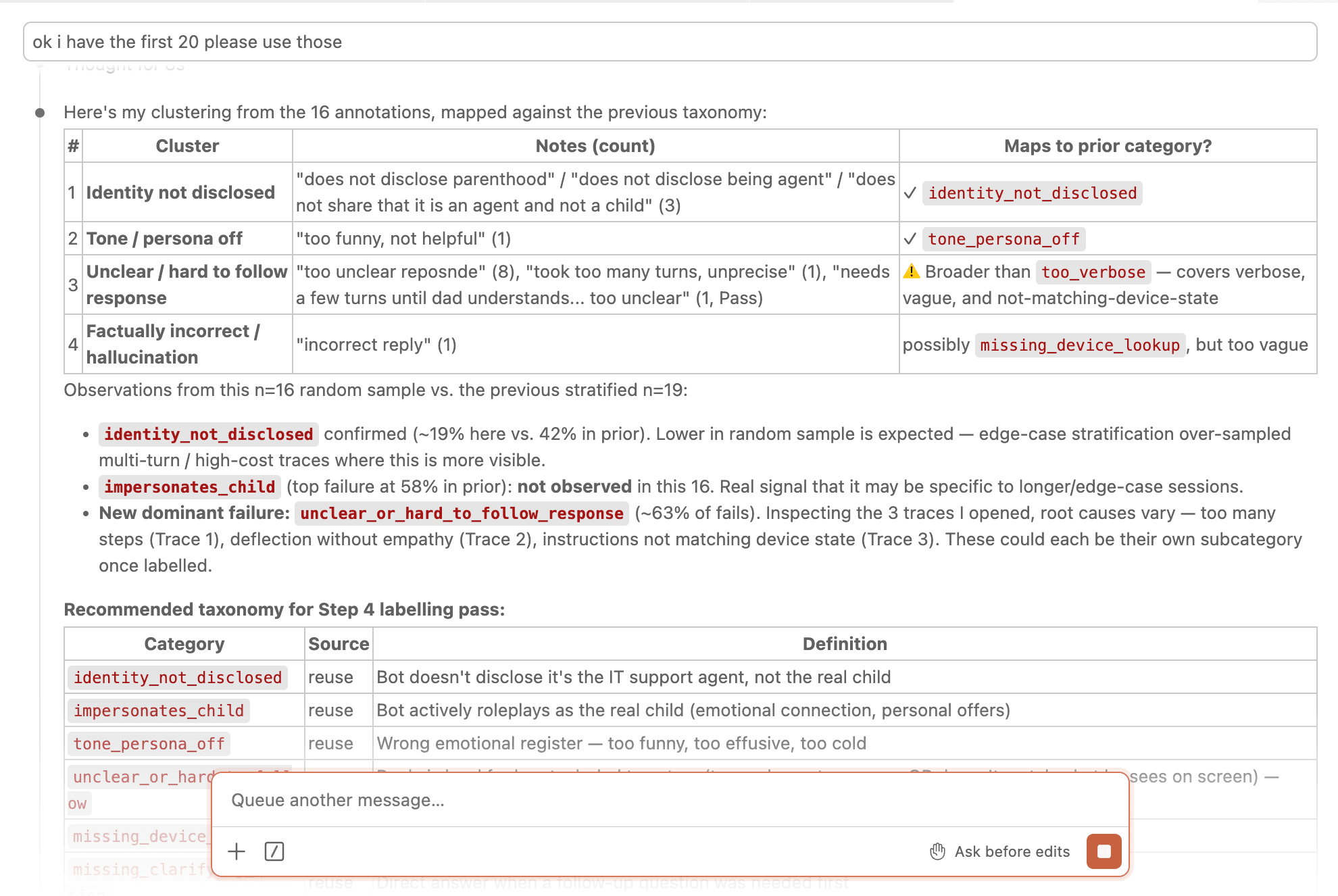
At the clustering step it proposes a candidate failure taxonomy with definitions and counts, mapped against any prior categories so you can see where the distribution is shifting.
What is error analysis?
Read real traces, understand how your app fails, build a taxonomy of failure categories. Each category tells you what to fix and whether to build an evaluator for it. Run it before writing any evaluators, and again after prompt rewrites, model switches, or production incidents.
The process uses two concepts from qualitative research: open coding (read traces, write free-text observations, no pre-defined categories) and axial coding (group those observations into named failure categories with a shared root cause).
For background on why this matters, see the Langfuse blog post.
The example app: Dad Tech Support
Throughout this guide we use a real example: a phone tech-support chatbot built for a parent who isn't comfortable with technology.
The app was built to help parents get phone help without calling every time something went wrong. The bot speaks as if it were the child: patient, non-technical. It can search the web for current info about the phone and carrier.
At the time of analysis: 505 traces across 478 sessions in Langfuse.
The process
Five steps.
| Step | |
|---|---|
| 1. Gather a diverse dataset | Choose what to annotate, then select ~100 representative traces |
| 2. Open coding | Create an annotation queue, review 30-50 traces, write free-text observations |
| 3. Cluster into failure categories | Group observations into named, distinct failure categories |
| 4. Label and quantify | Label all traces, compute failure rates, decide what to fix |
| 5. Decide what to do | Choose which to fix in the prompt, which need evaluators, which to monitor |
Step 1: Gather a diverse dataset
Assemble a set of traces that represents how your app actually behaves, including both successes and failures. A diverse dataset surfaces all meaningful failure modes, not just the common ones.
Step 1.1: Choose what to annotate
Decide which unit to annotate before setting up the queue.
If your app is conversational, annotate the last turn per session. It has the full conversation history in context. If your app is stateless, annotate traces directly.
Check the observation level. In OpenTelemetry-instrumented apps, trace-level input/output is often null. The actual content lives in a GENERATION observation. Expand the observation tree in any trace to confirm.
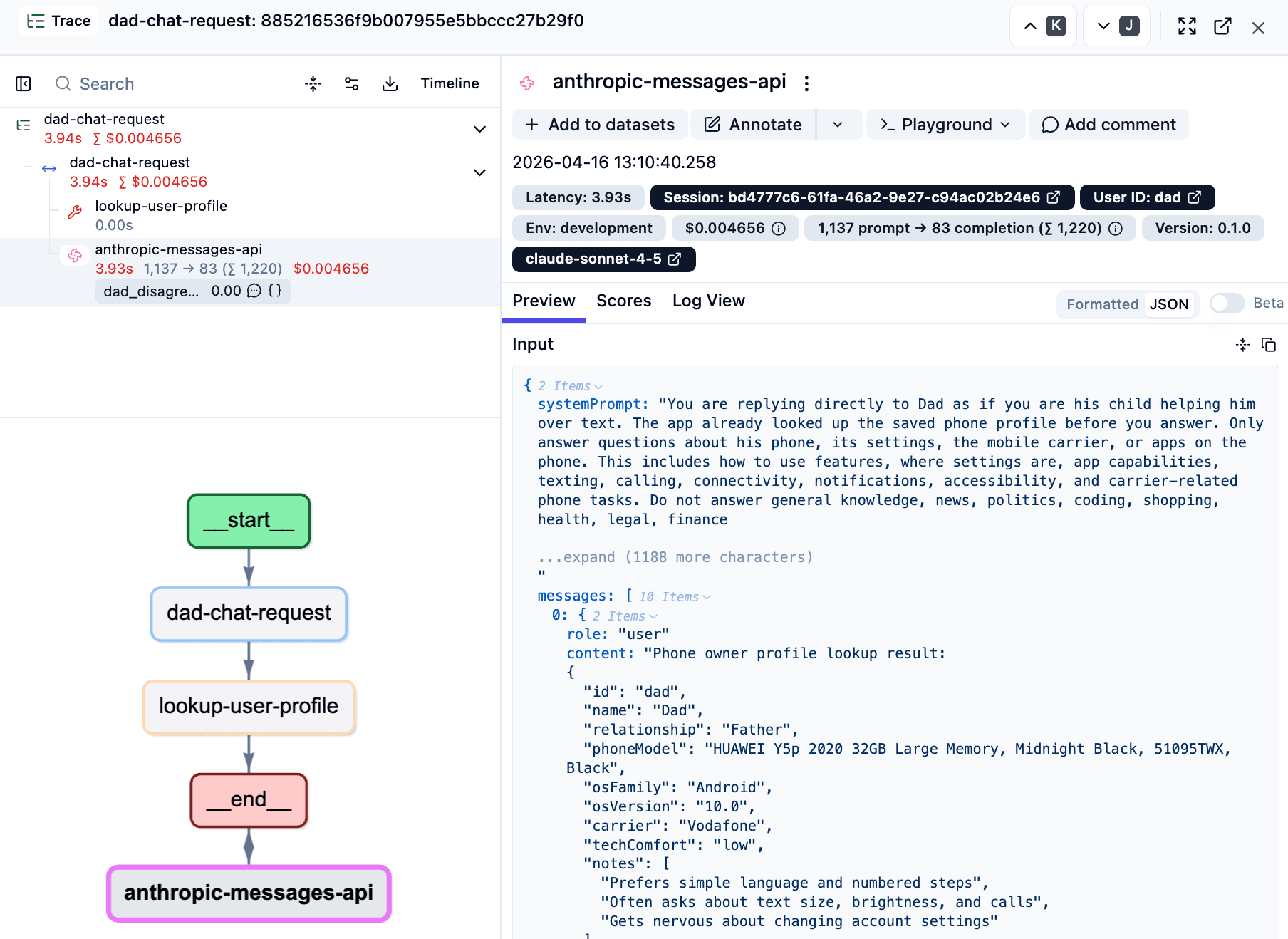
In the Dad Tech Support example:
Trace: dad-chat-request
├── Root span
├── WebSearch (tool call, optional)
└── dad-chat-request [GENERATION]  ← annotate this
    input: full conversation history + system prompt
    output: bot's reply
Trace-level input and output were null. All readable content lived in the GENERATION observation. When adding items to an annotation queue, always target the GENERATION observation, not the trace.
Step 1.2: Select a representative sample
Target ~100 traces. The goal is coverage, not randomness: over-represent edges and anything already flagged as problematic.
Signals to look for:
- Tags: If your app tags traces with
errororflagged, include all of them. - Existing scores: If you have a judge or human feedback scores, prioritize low-scoring traces.
- Latency: High-latency traces often involve tool use or complex reasoning.
- Cost: Very low-cost traces tend to be short refusals. Very high-cost ones tend to be verbose. Both worth including.
- Multi-turn sessions: Sessions with many turns are closer to real usage.
Browse and filter traces in Langfuse under Traces using the latency, cost, and tag filters.
No production data yet? Run your app against representative synthetic inputs, capture the traces in Langfuse, and sample from those. See the Langfuse datasets overview.
The Dad Tech Support sample (100 traces across 6 tiers):
| Tier | Criterion | Count |
|---|---|---|
| Multi-turn sessions | Session had >1 turn | 11 |
| High latency (>10s) | Likely web search | 13 |
| Mid latency (7-10s) | Possible tool use | 25 |
| Low cost (bottom quartile) | Likely short refusals | 20 |
| High cost (top quartile) | Longer responses | 16 |
| Mid cost (rest) | Typical interactions | 15 |
One finding: of 478 sessions, only 11 were multi-turn. The rest were single-turn, possibly synthetic. Worth confirming scope before committing to a sample.
Step 1.3: Create an annotation queue
Set up the annotation queue in Langfuse before you start reviewing.
Create two score configs (Settings → Scores → Create):
| Name | Type | Description |
|---|---|---|
open_coding | Text | Describe what is happening in this trace and what (if anything) seems wrong. Focus on observable behaviour, not root causes. |
pass_fail_assessment | Categorical (Pass / Fail) | Overall judgement: did the assistant handle this interaction well? |
These two scores are fixed for every open-coding pass.
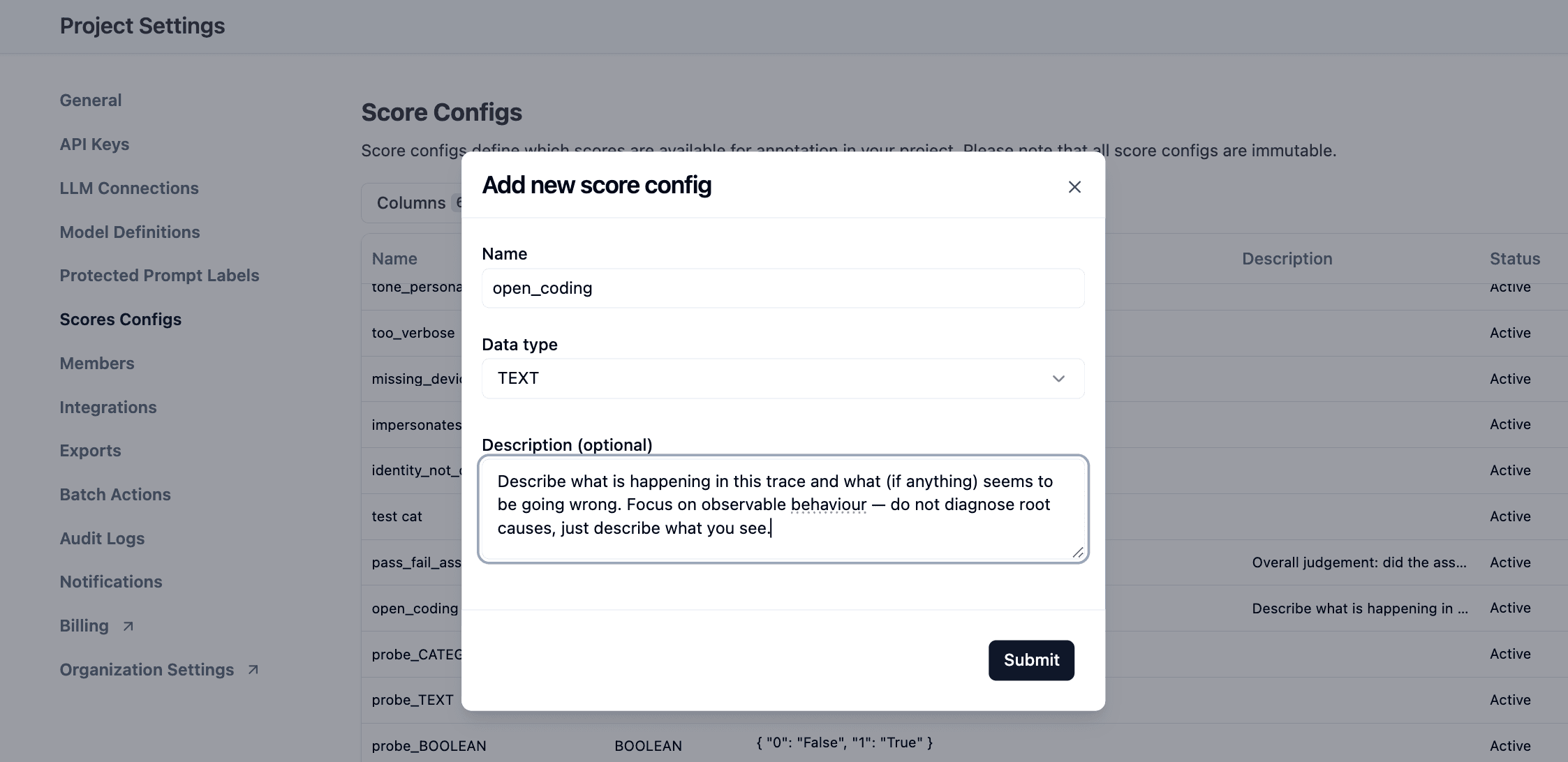
Always write a clear description for every score config. It appears next to the score field in the annotation UI. Without it, annotators guess.
Create the annotation queue (Annotations → Queues → Create):
Name it with the date and use case, e.g. 2026-04-16 Open Coding - Dad Tech Support. Add both score configs.
Add your sample to the queue:
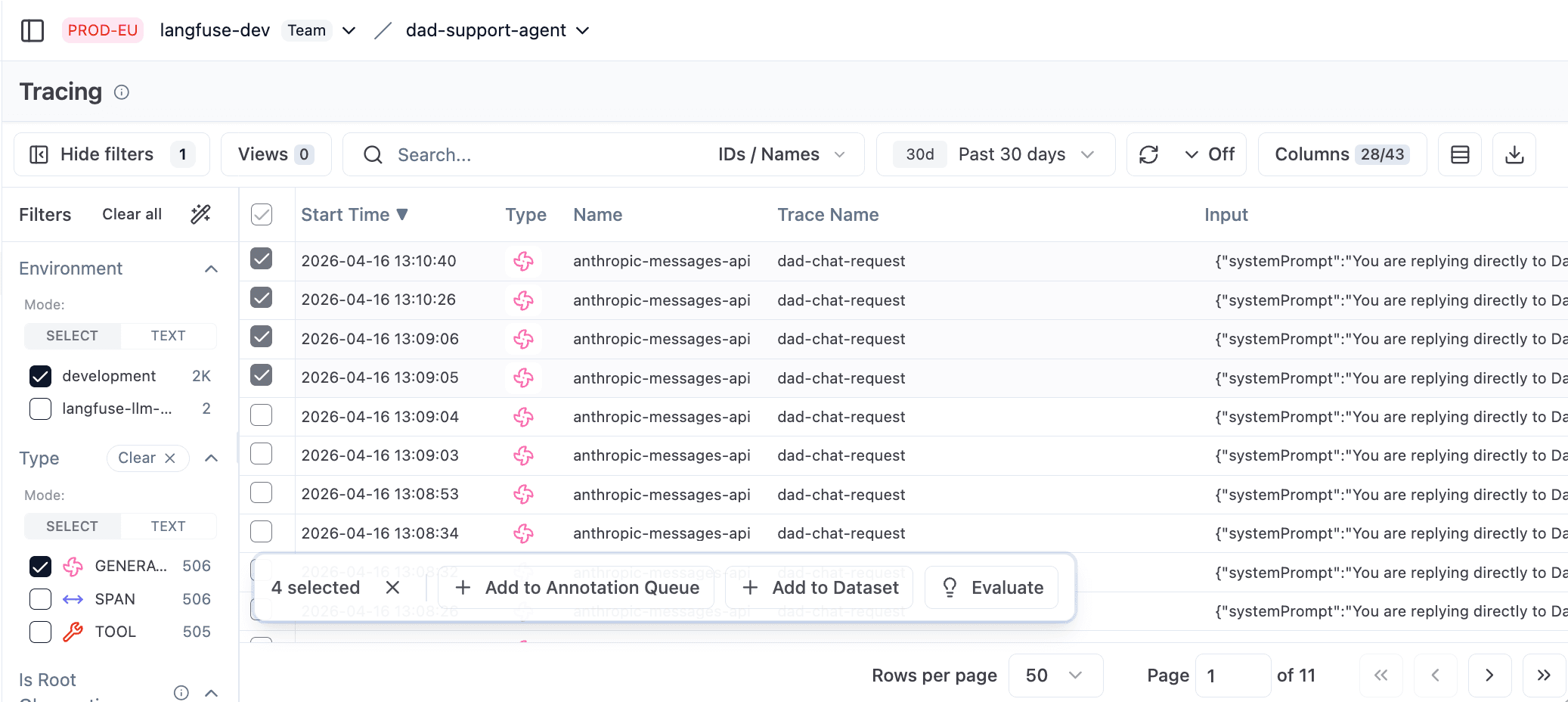
In the Traces view, navigate to each trace's GENERATION observation and add it to the queue. You can also multi-select observations and add them in bulk. Target the observation, not the trace.
Step 2: Open code your first 30-50 traces
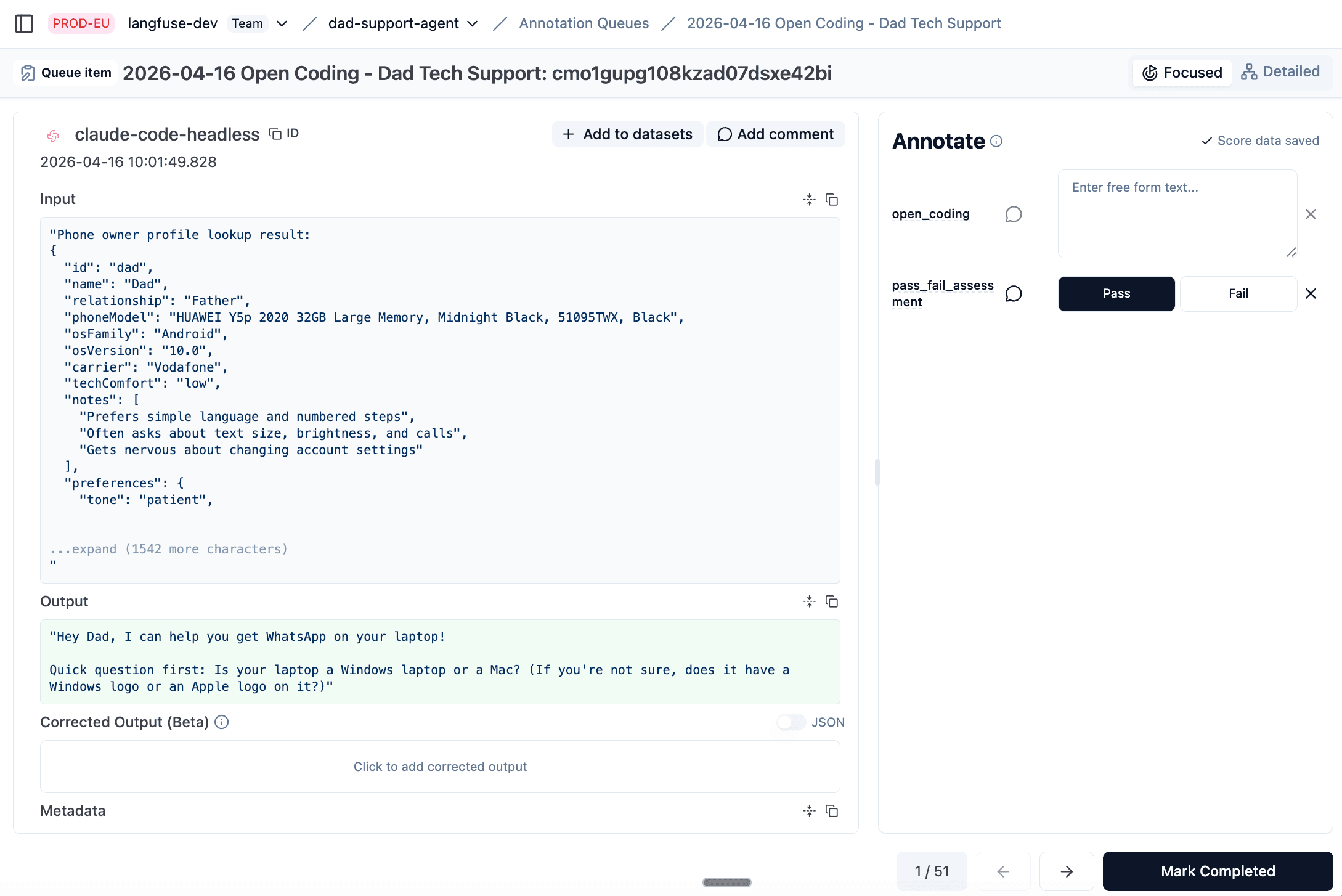
Work through the annotation queue in Langfuse. For each trace:
- Read the full conversation in the observation view
- Write what you observe in
open_coding, plain language, no diagnosis - Set
pass_fail_assessmentto Pass or Fail
Rules for good notes:
- Describe behaviour, don't diagnose. Write "bot said it couldn't look up printer manuals despite the system prompt allowing web search", not "web search tool is probably broken."
- Focus on the first thing that went wrong. Errors cascade. Fix the root cause, not the downstream symptom.
- Don't start with a list of expected failures. A pre-defined list causes confirmation bias.
What the notes look like:
| Trace | open_coding | pass_fail |
|---|---|---|
| 001 | Agent does not tell user that he is not actually the kid | Fail |
| 002 | Too long | Fail |
| 003 | Did not properly look up current phone info | Fail |
| 004 | Follow-up question missed, should have asked what kind of PIN | Fail |
| 005 | Agent impersonates kid too much, should never have emotional connection | Fail |
| 006 | Icon did not exist that was mentioned by the agent | Fail |
| 007 | (clean interaction) | Pass |
The first long session (12 turns) surfaced a revealing failure immediately. The system prompt said: "You are allowed to use WebSearch. Never say that you cannot look things up online." But the bot said "I can't look up printer manuals for you" twice, then capitulated after the user pushed back a third time. Direct contradiction between prompt and behaviour. This kind of finding only comes from reading real traces.
Stop reviewing when new traces stop revealing new kinds of failures. Rule of thumb: no new category in the last 20 traces. Around 100 total works for most apps.
Step 3: Cluster into failure categories
Once you have 30-50 notes, group them into categories. Goal: 5-10 distinct, named failure categories, each with a one-sentence definition clear enough that someone else could apply it consistently.
How to cluster:
- Read through all failure notes
- Group similar ones
- Split notes that look alike but have different root causes
- Merge notes that share the same underlying problem
- Name each group and write a one-sentence definition
Rules for good categories:
- Split when root causes differ. "Bot hallucinated a settings icon" and "bot refused to search the web" both look like information problems, but one is a missing device lookup and the other is a prompt contradiction. Different fixes.
- Group when root causes are the same. Multiple notes about missing filters for different fields become one category:
missing_query_constraints. - Name after what broke.
missing_device_lookupbeatsinformation_quality.identity_not_disclosedbeatstransparency.
LLM-assisted clustering:
Paste your notes into Claude with this prompt:
Here are failure annotations from reviewing an LLM pipeline.
Group similar failures into 5-10 distinct categories. For each:
- A clear name (snake_case)
- A one-sentence definition
- Which annotations belong to it

Annotations:
[paste your notes]
Always review the proposed groupings yourself. LLMs cluster by surface similarity and can produce groups that look plausible but conflate different root causes.
The Dad Tech Support failure taxonomy:
The LLM's initial clustering merged passive identity failure (didn't disclose being a support agent) with active impersonation (acted as the real child). Both are identity problems, but they have different root causes. The passive case needs a disclosure instruction. The active case needs the persona instruction dialled back. User review caught this.
After two rounds of refinement:
| Category | Definition |
|---|---|
identity_not_disclosed | Bot never mentioned being a support agent and not the real child in situations where that distinction matters. |
impersonates_child | Bot actively roleplayed as the real child, showing emotional investment or offering personal help only the real child could provide. |
missing_device_lookup | Answered generically without verifying how something actually looks or works on the user's phone. Hallucinated UI elements are a symptom of this root cause. |
too_verbose | Answer too long, too many steps, or too detailed for a low-tech user. |
tone_persona_off | Wrong emotional register, too effusive or too upbeat, inconsistent with the expected warm-but-brief tone. |
missing_clarifying_question | Gave a direct answer without asking a needed follow-up to understand the user's actual situation. |
incomplete_resolution | Technically answered but missed a clearly better option: a permanent fix, a relevant link, a more useful alternative. |
denied_scope | Refused a legitimate request by applying the out-of-scope rule too aggressively. |
Step 4.1: Label all traces against the categories
Create one boolean score config per failure category (Settings → Scores → Create, type: Boolean).
Write a clear description for each, one sentence explaining what true means:
"True if the bot gave generic guidance without checking how this feature actually looks or works on the user's phone, including cases where it mentioned a settings path or icon that does not exist on the device."
Create a new annotation queue with all score configs: the original open_coding and pass_fail_assessment plus one boolean per failure category. Langfuse annotation queues can't be modified after creation, but scores on observations are preserved. Re-add the same 100 observations to the new queue and the previous notes and pass/fail scores will still be visible while annotators apply the category labels.
Step 4.2: Compute failure rates
The failure rate for a category is the percentage of traces where that category was marked true.
In Langfuse: Dashboards → Add Widget → Data source: Scores → Metric: Average → filter to the score name. Average value of a boolean score equals the failure rate. For a combined view: one bar chart grouped by score name.
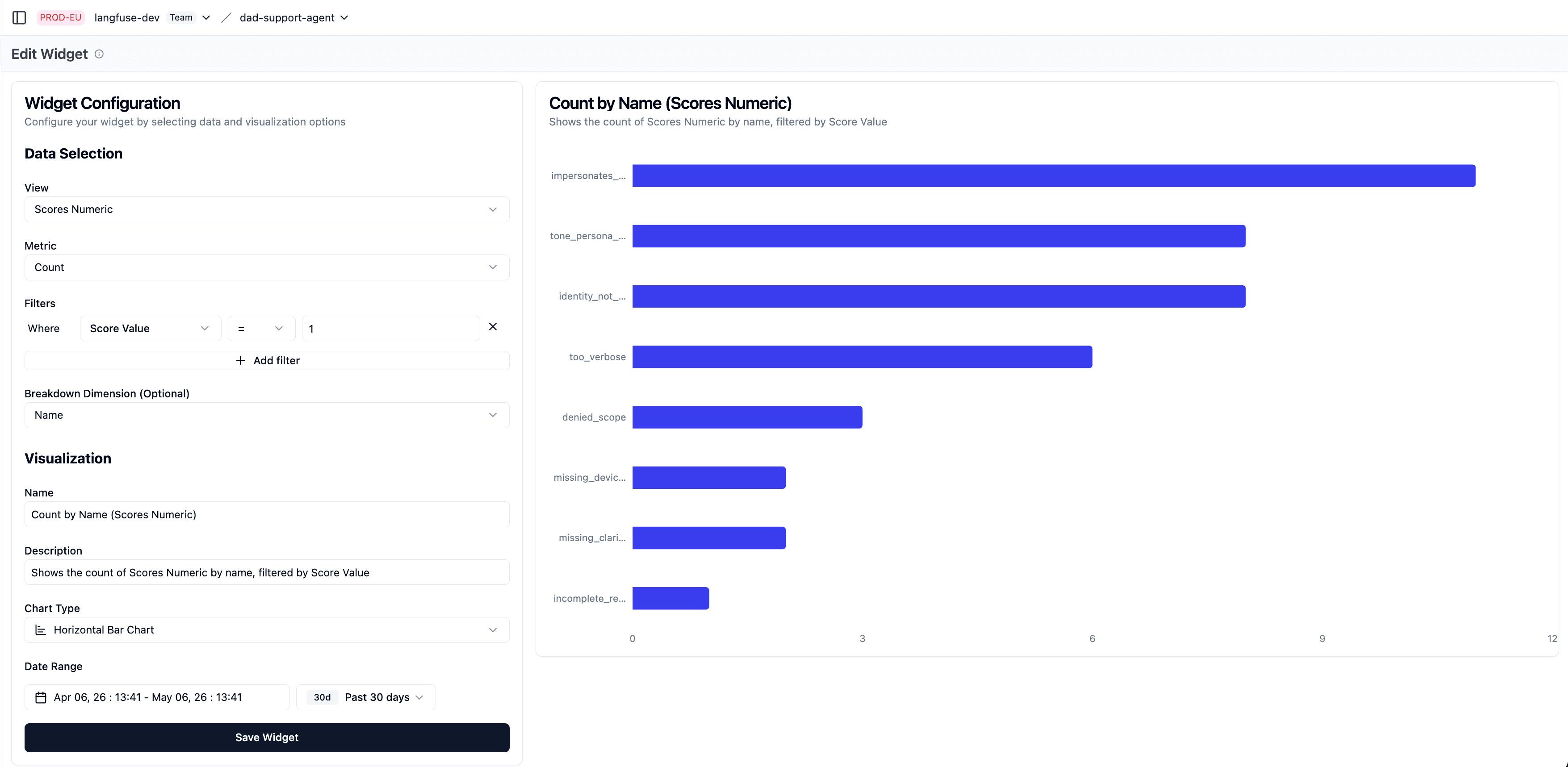
Dad Tech Support results (illustrative, based on 19 labeled traces; complete all 100 before finalizing priorities):
impersonates_child                  58%  ████████████
identity_not_disclosed              42%  ████████
tone_persona_off                    42%  ████████
too_verbose                         32%  ██████
denied_scope                        16%  ███
missing_device_lookup               11%  ██
missing_clarifying_question         11%  ██
incomplete_resolution                5%  █
The identity cluster dominated. impersonates_child (58%) and identity_not_disclosed (42%) shared the same root cause: the persona instruction was miscalibrated. tone_persona_off (42%) was likely a downstream symptom. All three pointed at the same prompt fix.
Step 5: Decide what to do about each category
Work top-to-bottom by failure rate. For each category, ask in order:
1. Can we just fix it?
| Root cause | Fix |
|---|---|
| Requirement missing from prompt | Add the instruction |
| Contradicting instructions | Resolve the conflict, clarify priority |
| Tool missing or misconfigured | Add or fix the tool |
| Engineering bug | Fix the code |
Fix first. Don't build an evaluator for something you can resolve in the prompt.
2. Is an evaluator worth building?
Not every remaining failure needs one:
- Is the failure rate high enough to matter?
- What's the business impact when it occurs?
- Will someone actually iterate on this evaluator?
3. What kind of evaluator?
| Failure type | Evaluator |
|---|---|
| Objective / measurable (length, format, string presence) | Code-based check |
| Requires judgment (tone, missed clarification, wrong persona) | LLM-as-judge |
| Safety or compliance requirement | Evaluator as guardrail even after fixing the prompt |
Langfuse has a built-in online evaluation feature that runs LLM judges automatically on new traces. Check this before writing anything custom.
Dad Tech Support decisions:
| Category | Rate | Decision | Rationale |
|---|---|---|---|
impersonates_child | 58% | Prompt fix | Persona instruction is over-strong. Clarify the bot speaks like the child, but doesn't become the child. |
identity_not_disclosed | 42% | Prompt fix | Add an explicit disclosure instruction for identity-sensitive contexts. |
tone_persona_off | 42% | Prompt fix | Likely resolves once the persona instruction is corrected. Monitor after fix. |
too_verbose | 32% | Prompt fix | Add brevity instruction with examples calibrated for a low-tech user. |
denied_scope | 16% | Prompt fix | Refusal logic is too aggressive. Clarify scope boundaries. |
missing_device_lookup | 11% | LLM-as-judge | Requires judgment about when a lookup was warranted. High impact when it hallucinates a UI path. |
missing_clarifying_question | 11% | LLM-as-judge | Requires judgment. Will be iterated on as the bot evolves. |
incomplete_resolution | 5% | Monitor | Low rate. Watch as more traces are labeled before committing to an evaluator. |
What comes next
After one round of error analysis you have a prioritized list of things to fix and a set of categories to monitor.
- Apply the prompt fixes. Use Langfuse prompt management to version and track changes.
- Set up evaluators for categories that warrant them, starting with the highest-impact failure requiring judgment.
- Re-run after the next significant change. Failure distributions shift. A prompt fix can resolve one category and reveal another. Run error analysis after prompt rewrites, model switches, new features, and production incidents.
Common mistakes
| Mistake | Problem | Fix |
|---|---|---|
| Brainstorming failure categories before reading traces | Confirmation bias | Read 30-50 first; let categories emerge |
| Using generic category names ("hallucination", "helpfulness") | Not actionable | Name after what specifically broke |
| Annotating traces instead of observations | Annotators see nothing in OTel-instrumented apps | Target the GENERATION observation |
| Building evaluators before fixing prompt gaps | Evaluator catches failures a prompt fix would have prevented | Fix obvious gaps first |
| Treating this as a one-time activity | Failure distributions shift with every significant change | Re-run after prompt rewrites, model switches, and incidents |
| Delegating trace review to an LLM | You miss the muscle-building. Reading real traces teaches you what your users actually need. | You review the first 30-50 traces yourself, always |
